"Let's continue on WhatsApp": the off-app booking scam
Imagine it's 6:40 AM and you're at the gate for a 7:15 flight. A text from "BKG-Support" says there's an issue with your reservation at Marisol Beach Hotel tonight, the app chat is unavailable, so continue on WhatsApp at a +44 number and have your card ready. Boarding starts in twenty minutes and you don't want to land without a room.
Moving you off the booking app is the opening move of a lot of hotel scams. Here's why it works, three versions of it, and the one habit that makes all of them harmless.
Why careful people still fall for it
People already use WhatsApp with hotels for normal things like arrival times, so a WhatsApp message doesn't feel strange. The scam borrows that trust and adds a reason to leave the app: chat is down, the hotel lost your booking, there's a better price direct.
Inside the booking app there's a record, and the platform can block a bad account or refund you. Outside it, nobody is watching and nothing you pay is protected. That's the whole point of the move.
Three ways you get pulled off the app
"Our app chat is unavailable. Continue on WhatsApp"
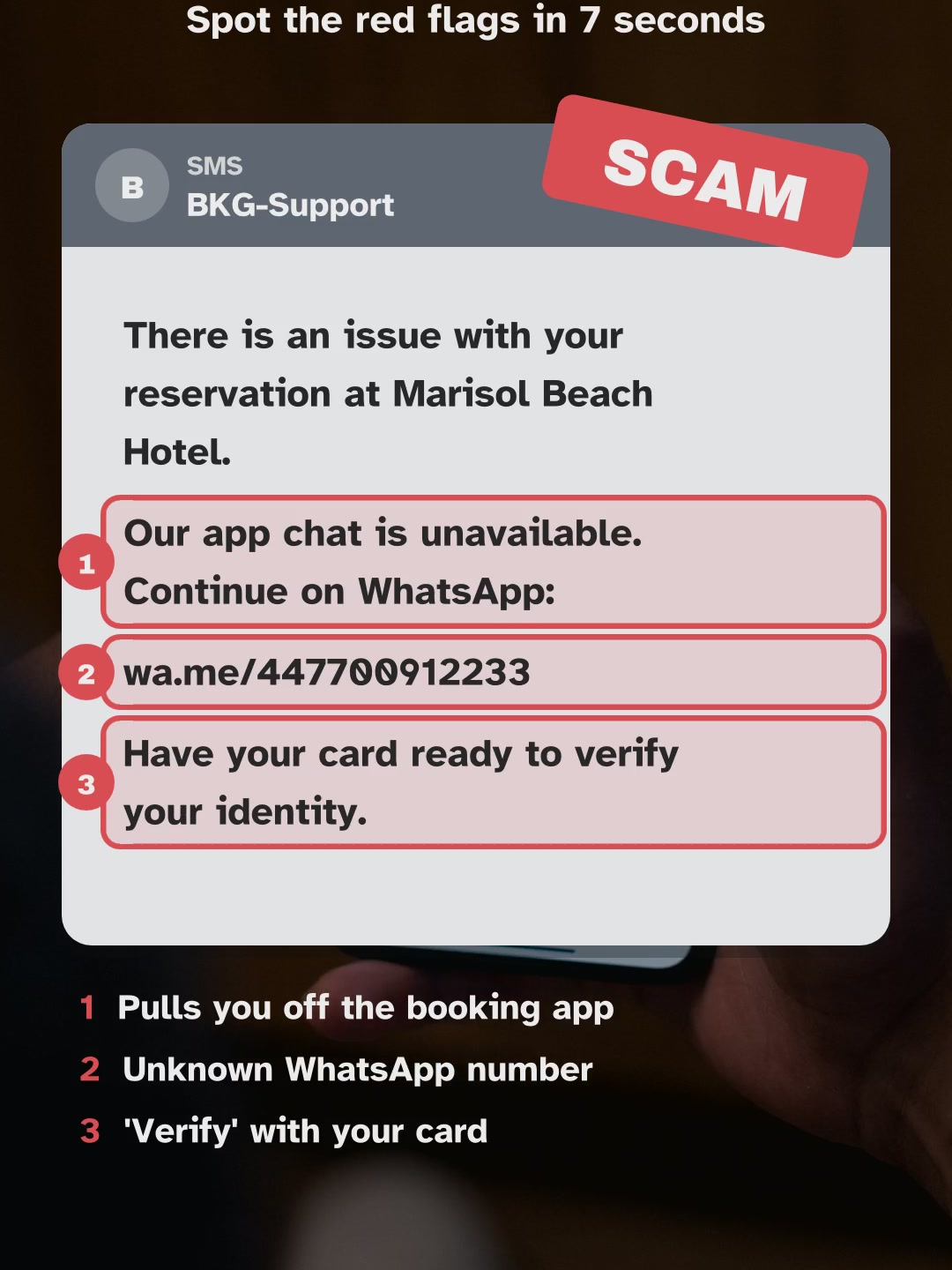
SMS · BKG-SupportThere is an issue with your reservation at Marisol Beach Hotel.Our app chat is unavailable. Continue on WhatsApp:wa.me/447700912233Have your card ready to verify your identity.
- Pulls you off the booking app
- Unknown WhatsApp number
- 'Verify' with your card
An unknown sender name, an unknown WhatsApp number and "have your card ready to verify your identity". Booking apps don't outsource support to random numbers.
Do this: reply only inside the booking app. If the app chat truly isn't working, use the help section in the app itself.
"We have no record of your booking from the app. Pay us directly"
SMS · +1 (415) 555 0182This is the Seaview Hotel front desk. We have no record of your booking from the app.To keep the room, pay us directly tonight:seaview-hotel-direct.com/payDo not contact the app, they cannot help.
- Pay outside the app, tonight
- Unknown payment site
- Tells you to avoid the app
This one plays on a real worry: travelers do sometimes hear a hotel never got their booking. But the fix is never "pay us on a separate site tonight and don't contact the app".
Do this: contact the booking app right away; it's their job to sort it out. Call the hotel on its official number to check.
"Book direct on our site and save 40%, bank transfer only"
Email · Reservations - Hotel Aurelio RomaBook direct and save 40%Thanks for your interest in Hotel Aurelio.Book direct on hotelaurelio-roma.com and save 40%.Payment by bank transfer only to confirm the rate.This offer is valid until tonight.
- Look-alike website
- Transfer-only payment
- Tonight-only deal
A lookalike address, a big discount and transfer-only payment. Real hotels sometimes offer direct rates, but they take cards on their own checkout and don't need you to wire money tonight.
Do this: find the hotel's website yourself through a search engine or map, never through a link in a message.
What happens if you go along with it
Say you move to WhatsApp. The chat is friendly and fast, which feels better than waiting for app support. Then comes the "verification": a card number, a small payment, or a transfer to keep the room.
Once you pay outside the app, the booking platform can't refund it, because as far as it knows nothing happened. The WhatsApp number goes quiet, and your original booking was fine all along.
Real message or fake? Side by side
| Fake | Real |
|---|---|
| Asks you to continue on WhatsApp, Telegram or a new site | Keeps the conversation in the booking app |
| Says not to contact the app | Tells you to check your booking in the app |
| Unknown number or lookalike website | Official hotel name and the number on its own website |
| Payment link or transfer to "fix" a problem | Problems fixed inside the booking, no new payment |
Take the scam-or-real quizCheck a message you got
If you already clicked or paid
- Paid on the other site or by transfer: call your bank or card provider today and dispute it.
- Shared card details in the chat: block the card and ask for a new one.
- Worried the booking is gone: open the booking app and contact its support; ask them to confirm with the hotel.
- Report the WhatsApp number in WhatsApp, and the message in the booking app.
Questions people ask
A hotel I booked on a big booking site messaged me on WhatsApp. Is that normal?
Friendly WhatsApp messages before arrival do happen. The warning sign is what comes next: a payment link, a card request, or a push to stop using the app.
The hotel says it never got my booking. What should I do?
Contact the booking app first; it has your payment and confirmation. Then call the hotel on the number from its official website. Don't pay again through a link.
Is booking direct with the hotel cheaper?
Sometimes. If you want to book direct, go to the hotel's real website yourself and pay on its checkout. Never use a link from an unexpected message.
How do I know a WhatsApp number really belongs to the hotel?
Compare it with the number on the hotel's own website or map listing. If it's different, treat the chat as untrusted.
Book where the price is on the page
Rates by Room shows the nightly rate read from the booking partner for 2359 hotels in 91 cities. You pay on the partner's own checkout, with the price in front of you, so there's no message to second-guess.
We earn a commission from the partner when a booking completes. It doesn't change your price.